Design every widget.
Choose each widget’s background, text, accent, opacity, font, position, scale, row count, and corners. Save the design locally or start with a whole-package theme.
Design every widget around your series. Choose colors, add your logo, arrange the layout, and take a complete broadcast identity live. Camera and incident controls stay close at hand.
Early beta / Windows + OBS / Pricing to be announced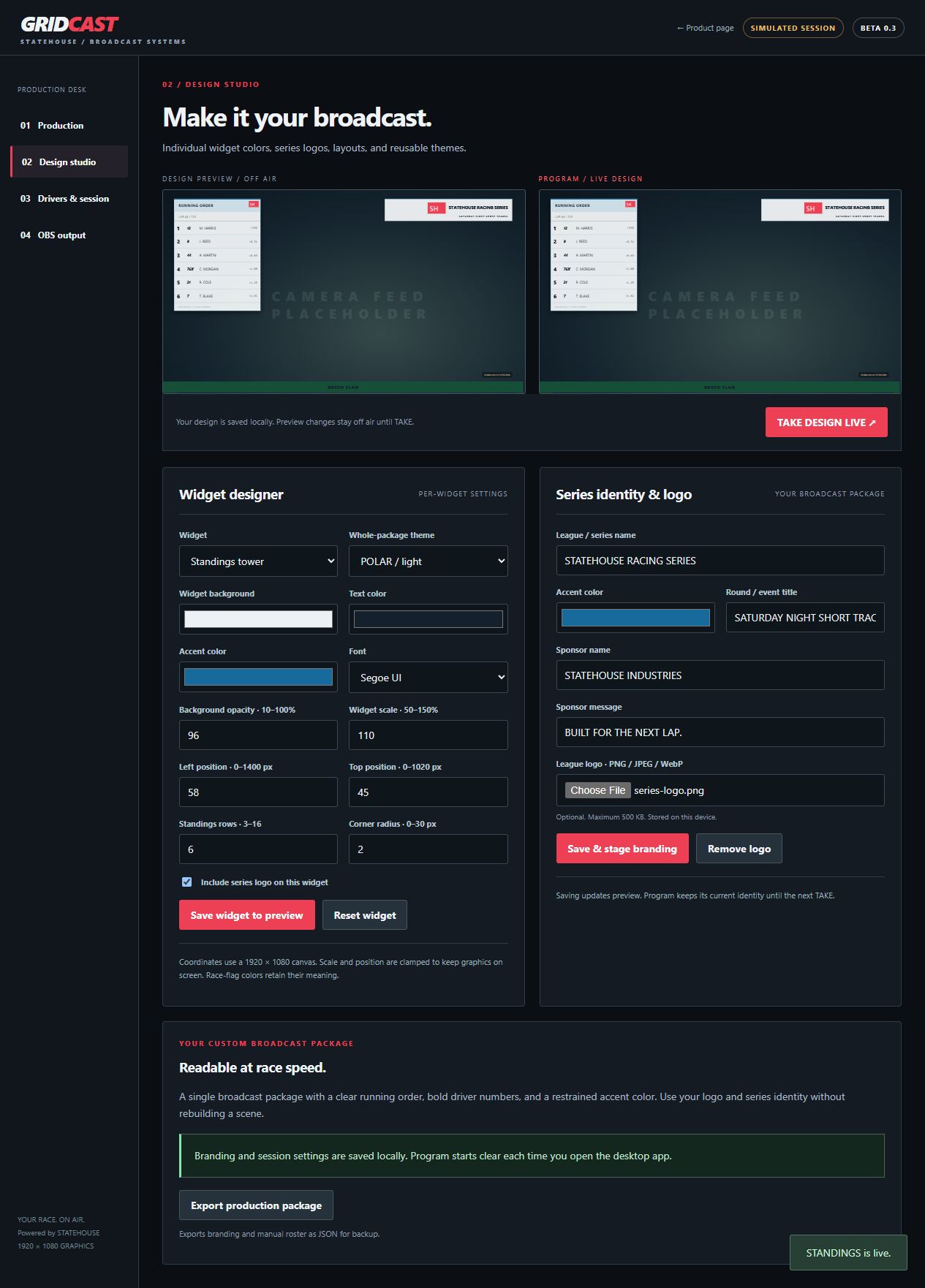
Choose each widget’s background, text, accent, opacity, font, position, scale, row count, and corners. Save the design locally or start with a whole-package theme.
Upload a series logo and choose which widgets display it. Keep your league name, event, sponsor identity, and graphics together in one exportable package.
Inspect your design off air before TAKE. Use transparent OBS output, switch iRacing camera groups, browse replay incidents, and return to live with one click.
Start in the design studio below. Change a theme or widget, save it to preview, then TAKE DESIGN LIVE to compare both outputs.
Interactive preview with simulated drivers. Program output starts clear. Press TAKE LIVE to show a graphic. Try the simulated camera and incident controls, then BACK TO LIVE. Browser tabs sync locally; desktop mode provides the OBS localhost source.
Request beta access by email. No payment required.